
Create a copier
The four-step form, and what each setting does.
You need at least two accounts before you can build a copier; the page tells you so and offers a link to Accounts if you do not.
Copiers → Create Copier runs a four-step form: Accounts, Risk, Trade Controls, Review.
Step 1 — Accounts
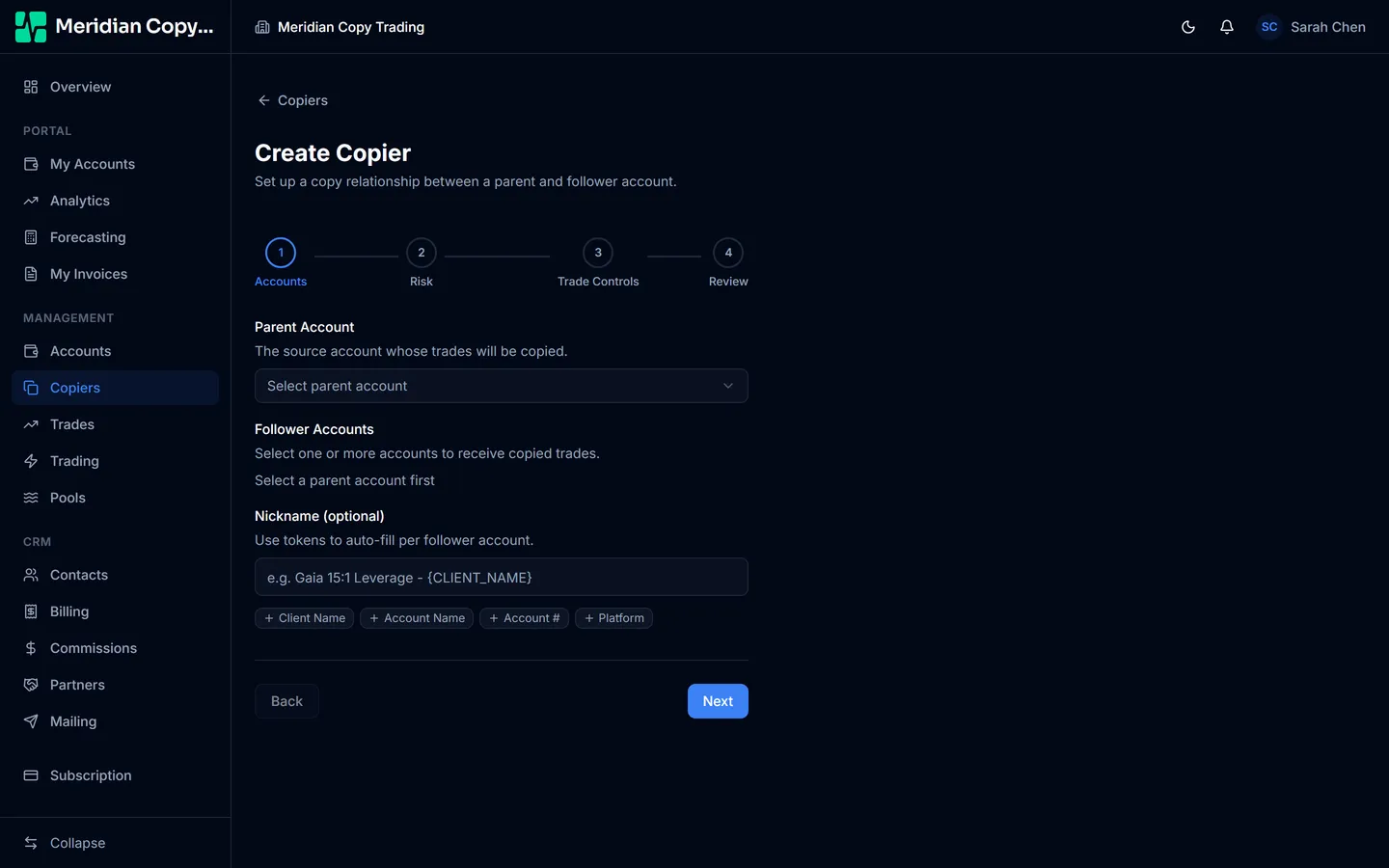
Parent account — the leader, whose trades are the source.
Follower accounts — click Select Accounts for a searchable, multi-select list. The parent is excluded from it, so you cannot copy an account to itself.
Selecting several followers here does not create one copier with many followers — it creates one copier per follower, all with identical settings. That is what you want: afterwards each one is independently editable, so you can retune a single follower without disturbing the rest.
Nickname — optional, and how you keep a list of thirty copiers readable. The
token buttons underneath insert placeholders that are filled in per follower:
{CLIENT_NAME}, {ACCOUNT_NAME}, {ACCOUNT_NUMBER}, {PLATFORM}. So
Conservative — {CLIENT_NAME} written once becomes a distinct, meaningful name
on each copier it creates.
Step 2 — Risk
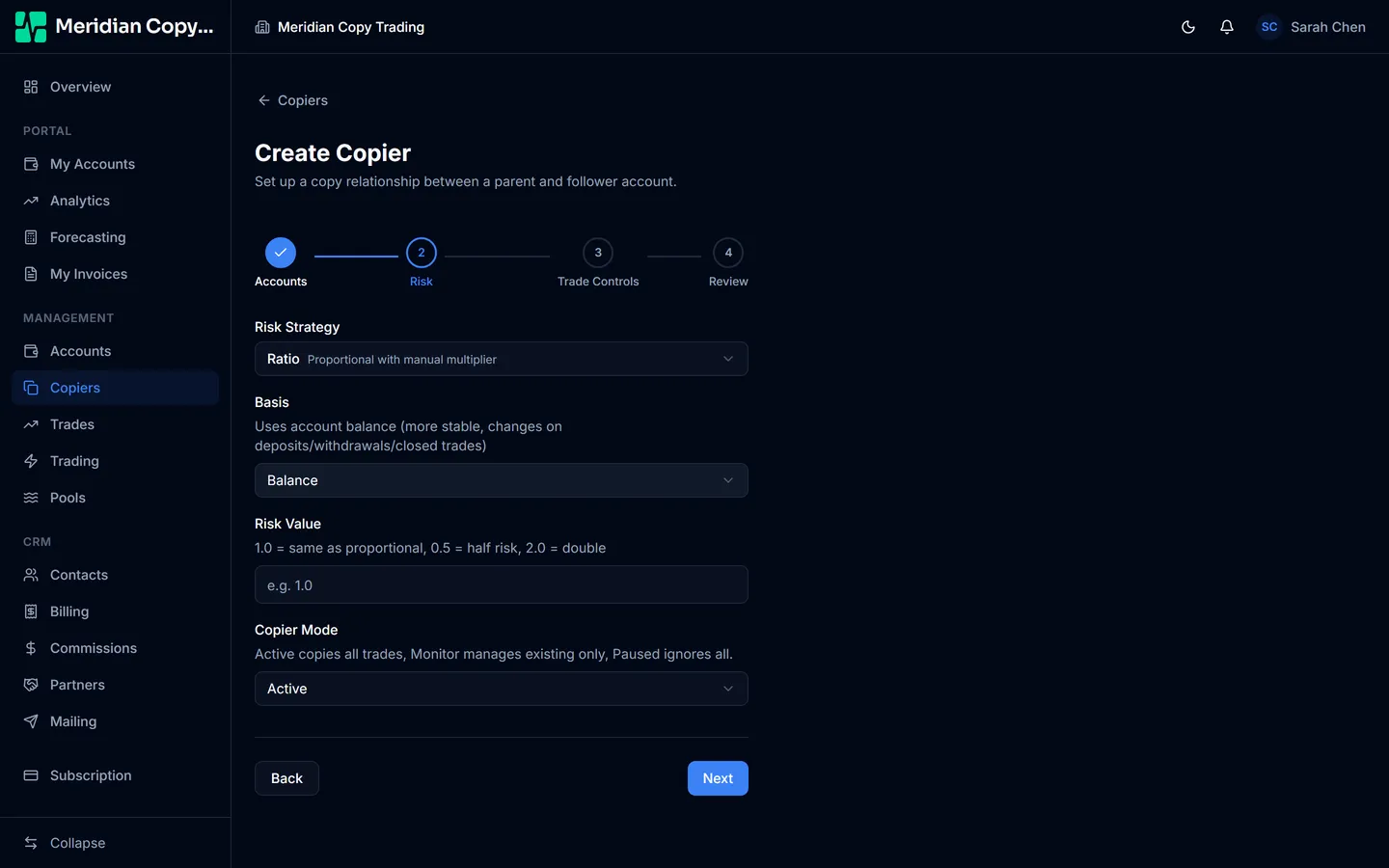
Risk strategy — Proportional, Ratio, Fixed Lot, or Lot Multiplier.
Basis — for Proportional and Ratio only: Balance or Equity.
Risk value — for everything except Proportional, which needs no number.
All four are explained properly in Risk types — this is the one decision on the form worth reading about before you make it.
Copier mode — Active, Monitor, or Paused. See Copier modes. Leave it Active unless you have a reason.
Step 3 — Trade controls
Copy Stop Loss and Copy Take Profit, each Mirror, Fixed, or None:
- Mirror — use the parent's own level. The default, and correct when the follower trades the same instrument at the same broker prices.
- Fixed — use a fixed pip distance you set on the copier afterwards, regardless of what the parent used.
- None — do not set one at all. The position is then managed only by the parent closing it.
Max Lot Size — a hard ceiling on any single copied position, applied after the risk calculation. It defaults to 100, which is effectively no cap; set it to something real.
Max Lot is your protection against a fat-fingered parent trade. Balance-ratio sizing faithfully reproduces a mistake: if the leader accidentally opens 50 lots instead of 5, every follower gets ten times its intended size unless Max Lot stops it.
Slippage (pips) — how far the fill price may move before the order is rejected. The form defaults to 3.
Reverse Trades — flips buy to sell and sell to buy. A deliberate strategy choice, not a correction for anything.
Copy Pending Orders — include limit and stop orders, not just market entries. Off by default: with it off, a pending order on the parent is ignored and only copied if and when it becomes a live position.
Currency Adjusted — on by default, and it should stay on when the parent and follower are denominated in different currencies. It converts the parent's balance or equity into the follower's currency before computing the ratio. Without it, a USD leader and a EUR follower produce sizes wrong by the exchange rate.
Hedging conflict policy — for brokers that prohibit hedging, meaning you cannot hold opposing buy and sell positions in the same symbol. Forex.com, OANDA US, and TastyFX are the common cases.
- Refuse and notify (default) — the conflicting open is blocked and you are alerted.
- Auto FIFO-order closes — the same opens are still blocked, but close commands are reordered so the broker's first-in-first-out rule accepts them.
Trade Guard — off by default. When on, it adjusts stop-losses automatically after a detected balance change, so a withdrawal does not silently leave open positions risking a far larger share of a now-smaller account. You set the direction (withdrawals only, or both), a percentage threshold that counts as a change worth acting on, a cooldown, and a minimum stop distance in pips.
Step 4 — Review
Everything you chose, in one table, grouped by section. Read it — this is the last point before the copier is live and, in Active mode, copying the next trade the parent makes.
Editing afterwards
Open a copier and use Edit. Everything from the form is editable, plus a few settings the create form does not expose:
- Max Open Trades — refuse new copies when the follower already has this many positions open.
- Force Minimum Lot — when the calculated size rounds below the broker minimum of 0.01, place 0.01 instead of skipping the trade.
- Fixed SL / TP pips — the distances used when Copy SL or Copy TP is set to Fixed.
- Staleness Guard — max signal age, fast-path threshold, and max price drift. See Filters and limits.
The parent and follower accounts themselves are fixed. A different pair is a different copier.