
Sign up
Create a workspace, choose your capacity, and pick your add-ons.
Sign up at dash.trademetry.app/signup.
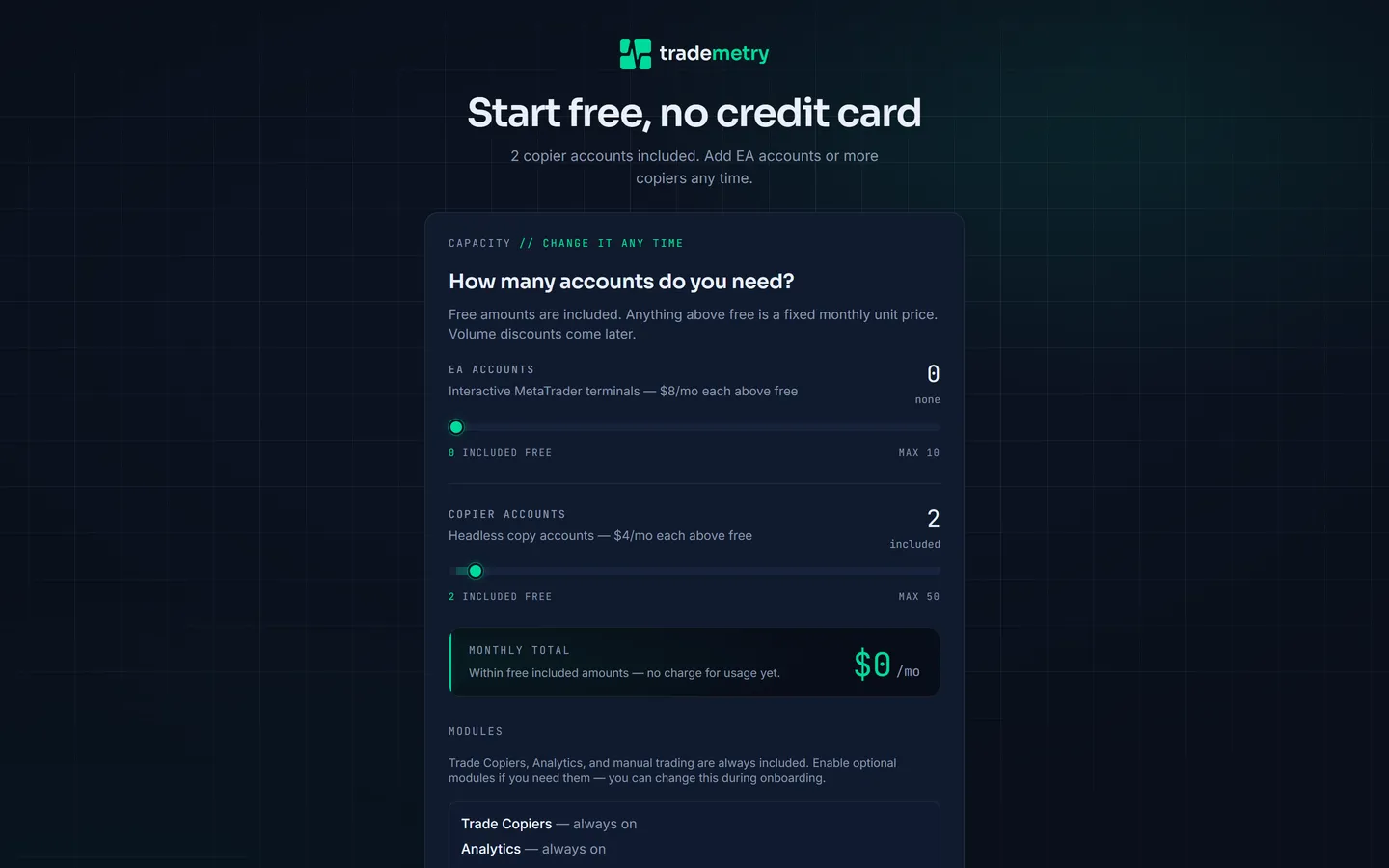
Choose your capacity
Two sliders set how many trading accounts your workspace can hold. Each has an amount included free; anything above that is a fixed monthly price per account, shown live as you drag. The running Monthly total updates underneath.
Copier accounts are the ordinary case. Trademetry runs the terminal headlessly — it logs in, watches trades, and places copies. There is no desktop to look at, and nothing to click. Almost every leader and follower account is this kind.
EA accounts get an interactive MetaTrader terminal you can open in the browser: a real desktop, with charts, and the ability to upload and run an Expert Advisor or an indicator. Choose these when the account itself needs to run something — a strategy EA generating the signals you copy from, say — rather than merely be copied to or from.
If you are unsure, take zero EA accounts. Capacity is not a one-time decision: you can move either slider later from billing settings, and the change is prorated to the days served.
Choose your add-ons
Below the sliders, three capabilities are listed as always on — Trade Copiers, Analytics, and manual trading — and cannot be turned off.
The five optional modules are checkboxes:
| Module | What it adds |
|---|---|
| CRM add on | Contacts, activities, and client management |
| Billing add on | Invoices, fees, and billing automation |
| Commissions add on | Agent and partner commission tracking and payouts |
| Mailing add on | Email campaigns, digests, and mailing templates |
| Pools add on | NAV-based pool and fund tracking for shared accounts |
CRM is worth a moment's thought even if you are not managing clients. It is what supplies contacts, and contacts are how you bring other people — teammates, agents, clients — into the workspace. Without CRM there is no contacts screen. See Invite your team.
You can change your module selection during onboarding, and afterwards under Settings → Modules.
Your details
- Company name (optional)
Leave it blank if you are signing up as an individual. When set, it must be at least two characters.
- Your name, email, and password
The password must be at least 10 characters. This becomes the workspace owner account — the one role that cannot be removed later.
- Accept the terms
Tick the box to accept the Payment Terms and Terms of Service. If your selection has a monthly total above zero, the same line authorises that recurring charge until you cancel.
- Submit
The button reads Create free account when the total is zero, and Continue to secure payment when it is not.
What happens next
If your selection is entirely within the free amounts, the workspace is created and you land straight in the setup wizard.
If it is not, you are handed to our payment provider's own hosted page to enter your card, then returned to the wizard. Card details never pass through Trademetry.
After a successful checkout you will see "Payment method saved" rather than "accounts activated". The extra capacity unlocks when the provider confirms the card, usually within a few seconds. Cancelling checkout is not a failure — your workspace is created on the free tier and you can add a card later.
Already have an account with that email? Signup refuses it and points you at the login page. One email address can belong to several workspaces; log in and pick which one you want.